Tool use
- Select a SCI level from the 4 selections available
- Then click on the associated co-morbidity to see recommended equipment
- Review recommended AT devices (some recommended equipment have AT hyper-links attached to it for easy access of a visual representations of the equipment)
Level of Spinal Cord Injury
Co-morbidities
recommendations
 Recommendation for Sacral w/ visual deficits
Mobility: Manual wheelchair, white cane (depending on severity of injury), hand control for driving
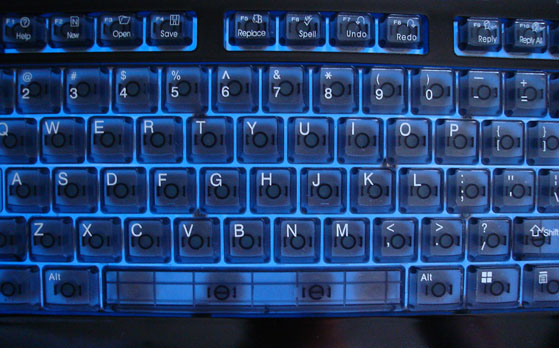
Computer Access: colored keyboards, large print keyboard, Dragon Natural Speaking, illuminated keyboards, magnifying software for computer
EADLs: voice activated, talking calculators, vibrating multi-sound wrist bracelets, Talking Thermostat
Communication Devices: large print setting on cell-phone, audio feedback function on phone
Reading: large print setting, recorded audio materials, braille, electronic reading machines, optical character recognition, screen readers, WWW with speech and braille displays, computer software built-in accessibility options like screen magnifications, closed circuit televisions
Writing: cellphone accessibility (new apple IOS systems with voiceover), audio alerts, e.g. tones to indicate critical information, accessible input and controls (Voice control), braille embossers, portable braille notetaker, high illumination, contrast script against surface
Recommendation for Sacral w/ dexterity deficits
Mobility: Manual wheelchair, crutches, hand control for driving
*depending on level of injury, client might be able to drive without adaptations
Computer Access: Dragon Natural Speaking (voice control), Co:writer software
EADLs: alarm use for medication management, voice command home control
Communication Devices: voice activated and voice control on cellphone
Additional: Built-up handles, and grips
Recommendation for Sacral w/ hearing deficits
Mobility: Light weight manual wheelchair, walker (depending on injury), hand control for car driving
Computer Access:
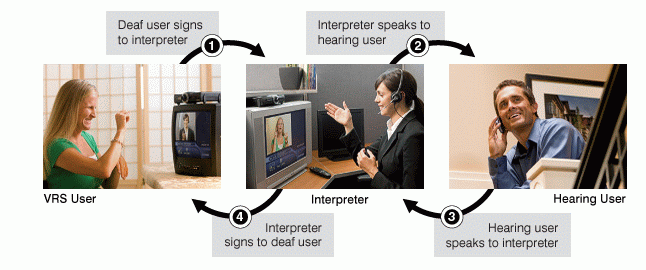
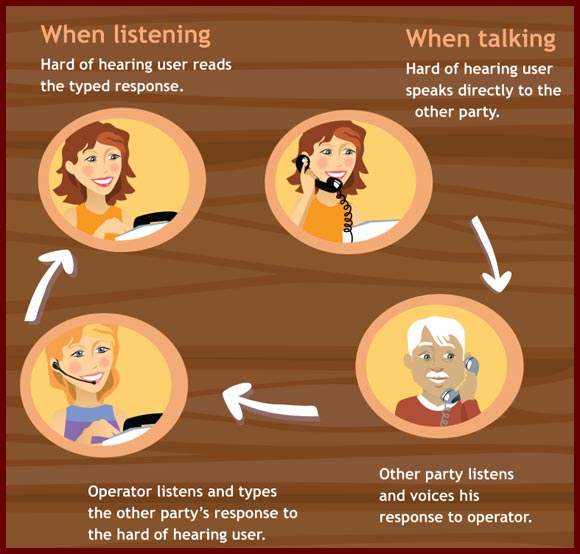
-Relay services can handle calls from traditional TTY, TTYs with Turbocode, computer modems (ASCII), as well as via Internet (IP relay) , Video relay service, Speech-to-speech service, Voice carry-over, Internet: sign language video service
EADLs: visual feedback systems, visual Alert Systems, Audio-to-Visual Signaling Devices, Audio-to-Vibrating Signaling Devices, Service dogs, TV: closed captioning
Communication Devices: Cellphone accessibility (new Apple IOS systems with voiceover), Cellphone with loud ringer setting, amplified corded phone, vibration and light ring tones, hearing aids with cellphone interface
Recommendation for Sacral w/ cognitive issues
Mobility: Manual wheelchair, hand control for driving
Computer Access: Intellikeys
EADLs: voice activated technology, picture schedule and calendar, picture based instructions, audio recorder
Communication Devices: smartphone with adapted task lists and utilizing built-in accessibility features on cell-phones
Writing: Livescribe smart pen
Additional: Task lists, Timer, manual or automatic reminder, schedules, calendars
Recommendation for Sacral w/ none
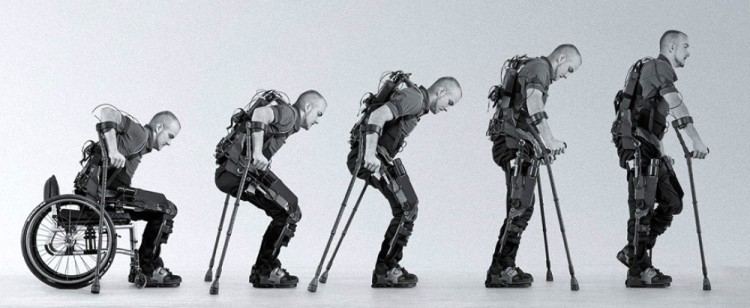
Mobility: Manual wheelchair (push assist wheels if fatigue is a factor), walker (depending on injury), hand control for driving, Exoskeleton walking system
Computer Access: no modifications
EADLs: voice activated systems (Quartet)
Communication Devices: non adapted telephones
Writing: Livescribe smart pen
Visual Deficits
Dexterity
Hearing Deficits
Cognitive Deficits
None
Things to consider when choosing AT
Key words:
1. Level of Spinal Cord Injury
2. What movements are available to the client?
3. Possible access points on client (head, chin, cheek, hands, elbow, knees, feet)
4. Clients familiarity with technology or openness for technology
5. Client goals
6. Clients psychosocial status
- Mental state
-
Emotional state
- Suicidal ideation
- Social health
- Spiritual health
7. Environmental concerns
- Where will equipment be used? (home, work, outdoors, play or school, rural vs city)
- Identified environmental (physical) and social barriers
8. Mounting: where will AT be mounted?
- Avoid mounting to movable components
- Mount above the tilt, if a tilt is present
- Consider a locking frame clamp if tilt is present
*MOST IMPORTANTLY, DON’T FEEL OVERWHELMED.
IF YOU CAN THINK OF AN AT SYSTEM, IT CAN BE CREATED*
-
Alternative input devices allow individuals to control their computers through means other than a standard keyboard or pointing device. Examples include:
- Alternative keyboards—featuring larger- or smaller-than-standard keys or keyboards, alternative key configurations, and keyboards for use with one hand.
- Electronic pointing devices—used to control the cursor on the screen without use of hands. Devices used include ultrasound, infrared beams, eye movements, nerve signals, or brain waves.
- Sip-and-puff systems—activated by inhaling or exhaling.
- Wands and sticks—worn on the head, held in the mouth or strapped to the chin and used to press keys on the keyboard
- Joysticks—manipulated by hand, feet, chin, etc. and used to control the cursor on screen.
- Touch screens—allow direct selection or activation of the computer by touching the screen, making it easier to select an option directly rather than through a mouse movement or keyboard. Touch screens are either built into the computer monitor or can be added onto a computer monitor.
- Accessibility software: software designed to help individuals with physical limitations
- Communication aides: electronic and non-electronic devices and software solutions that provide a means for expressive and receptive communication
- Computer access: input and output devices, alternative access aids, modified or alternative keyboards, switches, special software, and other devices and software solutions
- Electronic aids to daily living (EADLs): Any electronic technology used for the specific purpose of providing independent operation of any electrical equipment. EADLs can be adapted for control by any individual, as long as that person can perform a consistent voluntary action.
- Mobility: electronic and non-electronic aids such as wheelchairs (manual and electronic), walkers, scooters that are used to increase personal mobility
- On-screen keyboards provide an image of a standard or modified keyboard on the computer screen that allows the user to select keys with a mouse, touch screen, trackball, joystick, switch, or electronic pointing device. On-screen keyboards often have a scanning option that highlights individual keys that can be selected by the user. On-screen keyboards are helpful for individuals who are not able to use a standard keyboard due to dexterity or mobility difficulties.
- Switches and Switch Software: Switches offer an alternative method to provide input into a computer when it is not possible to use a more direct access method. Switches come in various sizes, shapes, colors, methods of activation, and placement options. An interface device and software program are usually required to connect the switch to the computer and interpret the operation of the switch.
- TTY: Text Telephone
- Visual Aids: electronic and non-electronic aids such as magnifiers, talking calculators, Braille writers, adapted tape players, screen reading software applications for the computer, and Braille note-taking devices.